Today I followed Jim around GAFE.
First I went to his session on-360 images and Google Street- Jim Sill
The street view app is a really cool way of viewing exciting places and looking around them. It allows your learners to be there using the magic of digital technology. The even better thing is that you as an educator can add to the bank of 360 images or make images that you can keep them private. You can use a normal camera or use a 360 camera. For more information click on Jim's name to go to his resources.
Exploring Google Expeditions with cardboard- Jim Sill
You don't need Google Cardboard for expeditions but it makes it better. You can buy cardboard really cheap but they won't as good as the just a little bit more expensive ones $7-10. Test the lenses and the quality of the cardboard.
Google expeditions uses street view so you can visit locations as if you are on a fieldtrip.
-It shows children a world outside of their backyards.
-Allows them to connect with the learning.
-Connect emotionally with areas and topics.
There is teaching material on the expeditions that teachers can use to support student learning. You can point children to different things to look at. You can see what the children are doing. It has guiding questions (With answers YAY!). As a teacher you can pause it but as Jim said if you pauses it the kids will get grumpy but it may have its uses.
The kit
It does not come as a kit but you may need to build a kit.
-You need phones or ipads
-Cardboard (not necessary but good).
-Teacher device (Tablet or Ipad)
-You need a network, local wifi network using a router. The local network because most schools block pair to pair sharing.
Jim Lead our expedition to El Capitan. Climbing up this huge mountain was a great experience. Jim had the ability to point out anything that we are talking about or things that kids might want to talk about.
Within expeditions you can search for them by subject.
Friday, 21 April 2017
Presentation two- Leading Learning using Google Sites
This session was about how we use sites and what learning looks like in our classrooms. It was another great session. Thank you to our wonderful open minded audience!
GAFE Day 2- Opening Keynote
To start the we were so very very privileged to have the amazing Aorere College Barbarshop group 'Fa Man'. Thank you to the four very talented young men who shared their passion with us it was wonderful.
Day 2-Keynote
Richard Wells presents 'Let learning TRUMP teaching & tech'
Richard started by saying I can tell the future I have been telling my children for years all you need to worry about is TRUMP.
Day 2-Keynote
Richard Wells presents 'Let learning TRUMP teaching & tech'
Richard started by saying I can tell the future I have been telling my children for years all you need to worry about is TRUMP.
Teachers and children often say in relation to learning:
"I hate it when he just keeps talking"
"I just want to work on the things I need to"
The thing that is interesting is that well teachers say this when they are the learners but as teachers do we still do it?
In England when he was at school, the school focused on letting children explore to learn but this didn't teach him the skills or strategies he needed to solve problems himself in reading.
Maybe why children love playing games is because each person has a role and everyone knows their role and the rules of the game so they can manage and play and solve problems themselves. Richards ideas that he is focusing on in his blogging is giving kids strategies so they can play on the pitch without the coach (teacher).
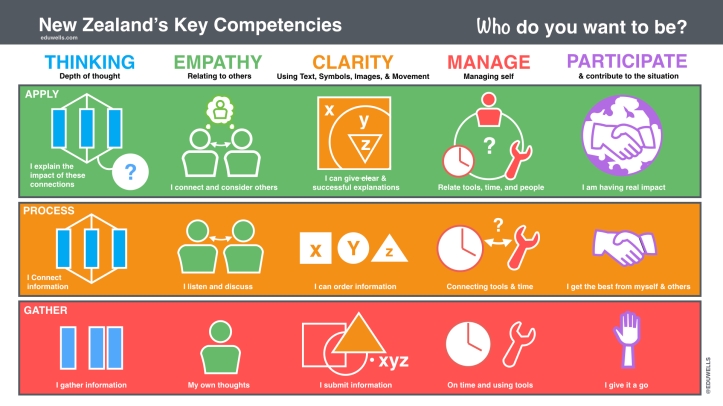
The classroom needs to recognise the individual learner not just the teacher. Here are some ideas of things people have given the kids to help them decide what they need to do.
How to we adjust to make sure children always know what they are doing. How can learners get feedback from each other and support each other to speed up the feedback loop.
Should they connect? How should they connect? Is one way of connect enough and what tools do they use to conduct these connections effectively.
Richards Wells suggest that we need to give learners access to all five tools, here is his blog post on this topic.
This is Richards awesome tools.
Relating to others especially when in confrontation, Well you can would together in Doc and Hangout students need to have tools and strategies for the students to do it.
Using language symbols and text, I can put stuff on a slide that no one can read. You can use text and images to really create and put children in the shoes of others using Google cardboard.
Managing self, Some tools for managing self timers. Timers are important if you teach boys if they have a time limit you will get more work out of boys. You can use calendars to organise your week. Groups can allow students to organise themselves.
Participate, The classroom should be a room where children feel safe and comfortable to contribute and participate. Google forms is like putting your hand up. In secondary school you can use Google+.
The first thing you need before you add your Google Tool they students need to know the How to of the Key Competencies for the use of the tools to be effective.
GAFE presenting
Today Karen and I presented a session on how to create Google Sites in classic sites. It was an awesome session with some amazing people who created the great beginnings of their future class or professional learning sites.
Below are our slide checks them out to help you start creating your site and using HTLM to make it amazing.
Thank you so much to Karen Belt for supporting me and sharing this amazing experience with me.
Thursday, 20 April 2017
GAFE session 4
Story writing in the digital classroom-Kimberley Hall
I have not quite finished animating my story.
Writing choose your own adventure story. Using google slides to create your choose your own adventure story.
When you are doing this you want to plan because you are linking to things that are happening in the future.
I have not quite finished animating my story.
Writing choose your own adventure story. Using google slides to create your choose your own adventure story.
When you are doing this you want to plan because you are linking to things that are happening in the future.
GAFE Session Two
Session two- A-Z of lesser known Googley Goodness-Kimberley Hall
This session was full of great apps and ideas that are awesome for using for a range of things.
We started the session by looking at Googlefeud which is like family feud but uses search results from google so think American when you play.
My favourite things discussed.
Androidify is a great you can made cute little character GIFs. Would be awesome for creating characters for a story.
Google arts and culture allow you to explore art galleries around the world and zoom in on detail. The world wonders section allows to walk along the great wall of China. Great way to get outside the classroom.
Boomerang for email you can get emails send back to you. It even tells you how likely you are to get a reply.
Chrome Experiments This is where new things that people are thinking about adding to chrome great for exploring cool things.
Quick, Draw This is a program that tries to guess what you are drawing.
Explore in google, You can use explore within the docs and slides using the explore function. In slides it will suggest slide layout. With sheets it will help you create charts and graph.
Geoguessr, This drops you in a random location on earth and you have to guess where you are based on the surrounds. Great way to teach problem solving. You can google things but there is no way to google the answer.
HelloSign for GMail Gmail extension that adds onto gmail allows you to sign things in your email.
CraftyRights Extension that makes sure you only get free to use images.
We always need music for movie making and here is a great was of getting free to use music. There is sometimes creative commons guy that means attribute which is the right thing to do anyway. Audio Library in YouTube.
MyMaps-This allows to to do loads of cool things with maps find the size of nz and find the percentages of other colours.
Piktochart- integrated into drive, for creating infographics.
Public Data- Data collects can be used for a range of purposes.
Rain Alarm- The extension tells you when rains is on the way great for making sure you are not outside when it rains.
The Great Suspender- Stops background activity on tabs that you are not currently on.
Great session, Wonderful ideas, Thank You so much for sharing Kimberley
GAFE- Session One
Experience a student-led classroom - today! Richard Wells
Share, Create, Critique- The idea of this session is to share and work together to create a resource that we can all use.
The main reason we are in this session is that teachers work too hard, so let work out how we can get the learner to do the work.
Children must reflect on their own learning naturally and self-assessment.
What is the elephant in the room? The key word for educate is to negotiate, you must negotiate so that you avoid the elephant in the room.
To do with well we need to take a step back from the technology, like how do the children have a conversation.
Part of working in a student lead classroom is negotiating the rubric for the grading.
Richard Wells- has thinked the key competencies in terms of solo.
If we think about Rugby as a design of learning, The coach is not on the field with the children they set the plays before hand and then let the game happen. How can we do this in the classroom?
We have created a google presentation Key Competencies
Computer games give feedback every 1.5seconds that is a small feedback loop. How can we make our feedback loop smaller?
Share, Create, Critique- The idea of this session is to share and work together to create a resource that we can all use.
The main reason we are in this session is that teachers work too hard, so let work out how we can get the learner to do the work.
Children must reflect on their own learning naturally and self-assessment.
What is the elephant in the room? The key word for educate is to negotiate, you must negotiate so that you avoid the elephant in the room.
To do with well we need to take a step back from the technology, like how do the children have a conversation.
Part of working in a student lead classroom is negotiating the rubric for the grading.
Richard Wells- has thinked the key competencies in terms of solo.
![]() |
| By Richard Wells |
We have created a google presentation Key Competencies
Computer games give feedback every 1.5seconds that is a small feedback loop. How can we make our feedback loop smaller?
Subscribe to:
Posts (Atom)